Using Linux Dev Containers to Help Create Machine Learning Models
One of the hardest parts of machine learning development has nothing to do with models, math, or even data. It’s the environment.
Over the years, I’ve lost track of how many times I’ve seen my projects slow down or just plain break because of a wrong Python or library version. Even putting it all in a virtual environments there are times when things just don’t work right. For me, these issues have become even more severe once I moved from just Python code and start mixing in NumPy, pandas, Polars, and SciKit Learn, with a dose of MatPlotLib, each of which has its own performance considerations and native dependencies.
This year specifically I’ve found myself building more customized ML models for my work and after a few that took too long to setup, I realized it was time to finally build a proper foundation: a repeatable, portable, Linux-based development environment that I could use for everything moving forward.
What you’re reading is a summary of how I currently setup my Linux dev container for machine learning and what’s happening at a high level inside the container configuration, and how this sets me up for repeatable, scalable ML work for my future work.
Why Start with a Dev Container?
A Linux dev container gives a clean, predictable baseline that mirrors how ML workloads run in production. Even if you’re building your models on macOS or Windows, the container ensures that your code executes inside a controlled Linux environment every single time.
More importantly, dev containers allow you to version-control the environment itself. Instead of writing setup instructions in a README and hoping others follow them correctly, the environment becomes part of the project. Open the repo, build the container, and you’re ready to work. And once it’s on my git repository, I can even build the container right from that repository.
The Dockerfile Configuration
The Dockerfile is the heart of the dev container. There are other pieces like the compose file and VS Code configurations, but the Dockerfile is the core. Rather than walking line-by-line through the configuration files, I want to explain the intent behind them. First, let’s go over the Dockerfile, then I’ll talk about the setup in VS Code.
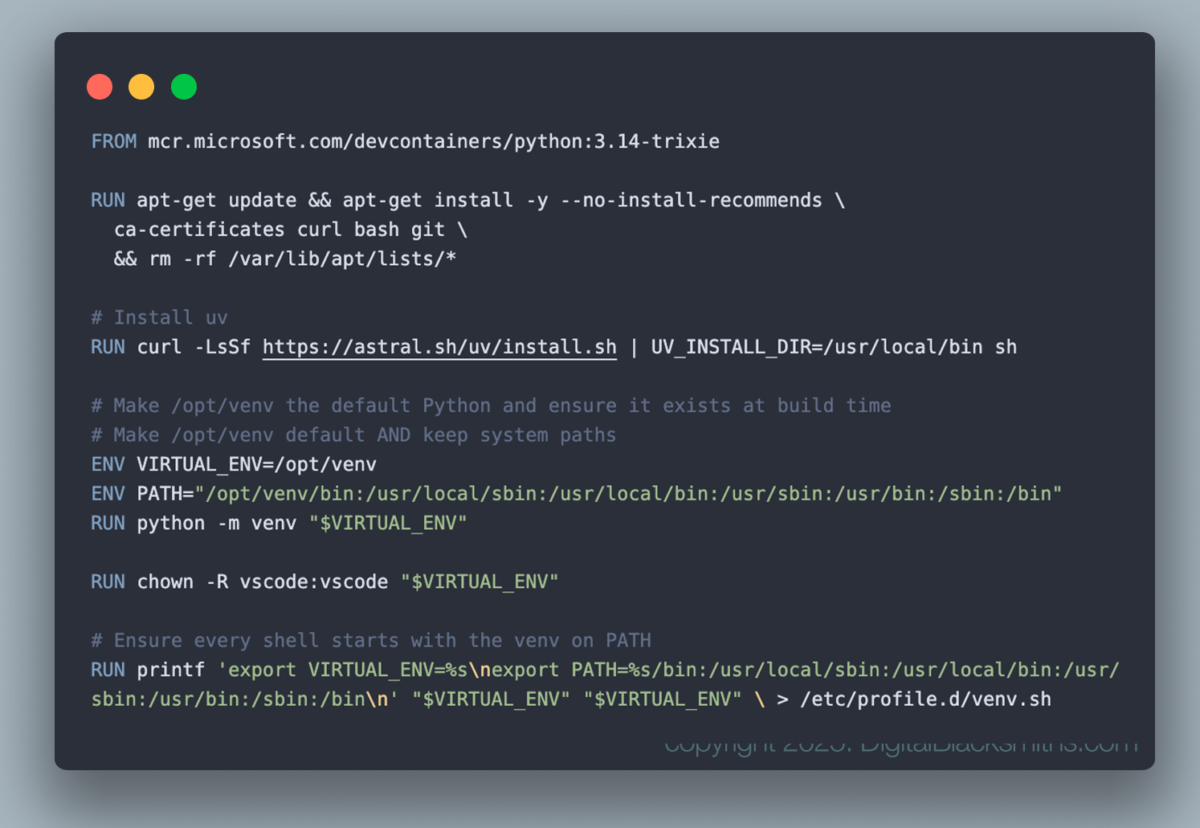
Choosing the Base Image
The container starts from a modern Python Linux image (the first line starting with FROM that builds it from the Debian “Trixie” base. This provides stability, excellent package availability, and predictable behavior for scientific Python libraries. It’s also a good match for compatibility with cloud VMs and container platforms.
Starting from a Python-first image means we don’t fight the runtime from day one. Python is already present, properly installed, and suitable for building higher-level ML tooling on top.
Dependency Management with Modern Tooling
There’s a popular philosophy that the dev container should be a lean, bare bones image. For images you will deploy at large, sure, I agree. But for me, I wanted to replicate my personal development environment with the tools I’m used to using. Tools like zsh and uv instead of bash and pip, for example. So this is based with that idea. I’m not building containers that will be spun up hundreds of time to run one task and then destroy itself. Instead, I’m spending more time developing, and I don’t mind having an image that is a hundred Megs larger to build or that takes 2 minutes to build. I’m more concerned with having that reproducible environment.
This is especially important when working with NumPy, pandas, Polars, and SciKit Learn together. These libraries are tightly coupled to native extensions, and small version mismatches can cause real problems, sometimes even silently. Locking the environment eliminates that entire class of issues.
Dev Container Configuration with VS Code
The devcontainer.json file tells VS Code how to treat this environment as a first-class development workspace. When the container starts, it knows:
- Where the workspace lives inside the container
- Which Python interpreter to use
- Which extensions should be installed automatically
- How the terminal should behave
This means everyone working in the project gets the same editor behavior, the same interpreter, and the same tooling without manual setup.
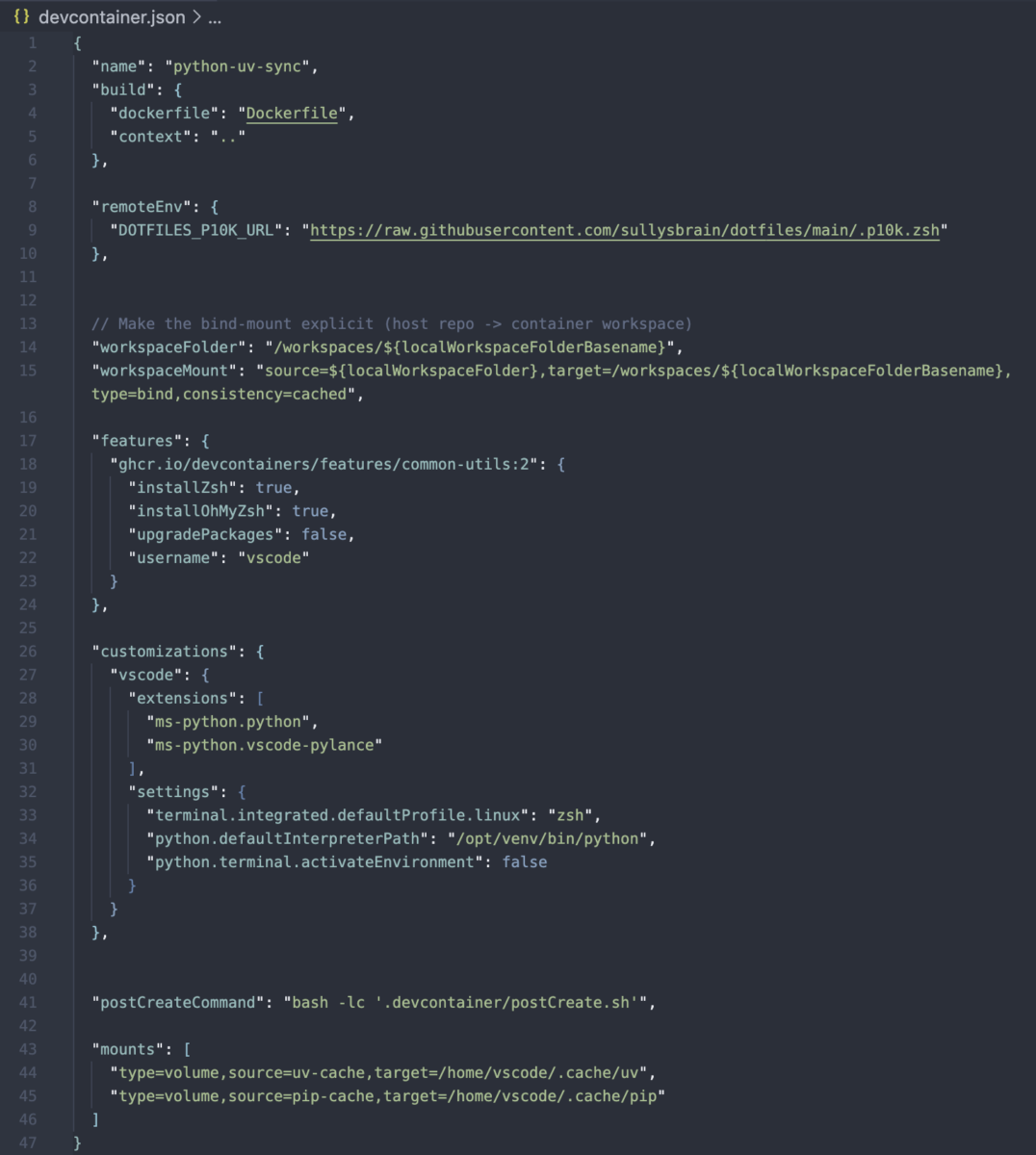
This file does several things. It tells VS Code which Dockerfile to build and what files to copy into the container (it does this through a bind-mount that allows you to have your local project’s folder in the container). Additionally, I can setup environment variables and any scripts to run when the container starts through the use of the postCreateCommand.
The Role of postCreate.sh
You’ll notice my postCreatecommand calls another script. Normally this line is a relatively short bash script that runs once the dev container is created. I wanted to be able to abstract this out and use consistent versions of this, so I broke it out into its own file. This postCreate.sh script deserves special mention, and it will get its own deep-dive article later on in this series.
At a high level, this script runs after the container is built and the workspace is mounted. Its job is to handle all the “developer experience” tasks that don’t belong in the Dockerfile itself.
Separating this logic from the image build keeps the Dockerfile focused on the runtime and lets us iterate quickly on developer ergonomics without constantly rebuilding the image. This distinction between the runtime and the workspace initialization is subtle, but powerful.
Why This Matters for Machine Learning
So why go through all this effort just to “get started”?
Because machine learning workflows compound complexity over time.
These days, I’m building models using lots of different tools. As I mentioned above, tools like scikit-learn, NumPy, pandas, and Polars. From here, I can even tweak it. But starting with this base image, it gets me most of the way there and then I can branch a project off as needed. For some I might add:
- PyTorch
- GPU acceleration (for pushing to Azure)
- Experiment tracking
- Model packaging
- CI pipelines
This past spring, I spent a week just trying to get one of my projects back to a running state after I made a small update that broke everything. If your foundation is fragile, every new layer becomes painful. If your foundation is solid, each addition feels incremental instead of overwhelming. Now, if I ever get to point where something breaks I can always roll back to the main container and be in a fully working condition.
Setting the Stage for What Comes Next
I know I breezed through this article. This was partially intentionally as I wanted to give you the basic foundation of what I am doing so you can start building on your own and playing with these tools. Soon, I’ll be getting into the actual model training. But this will keep you grounded in what I’m doing, knowing what sort of environment I’m using to run everything.
By starting with a repeatable Linux dev container, every one of those steps becomes easier, cleaner, and more trustworthy.
Machine learning isn’t just about clever algorithms—it’s about building systems you can reason about, reproduce, and improve over time. This setup is how we begin doing exactly that.
Hi. I'm Scott Sullivan, a slave of Christ, author, AI programmer, and animator. I spend my time split between the countryside of Lancaster, Pa, and Northern Italy, near Cinque Terre and La Spezia.
In addition to improving lives through data analytics with my BS in Computer Science,
I also published, Searching For Me,
my first memoir, about my adoption, search for my biological family, and how it affected my faith.